Help Centre / Reports & GST/BAS / The GST report — getting ready for BAS
The GST report — getting ready for BAS
How JobFlo works out GST collected, GST credits and the net figure, broken down by BAS quarter.
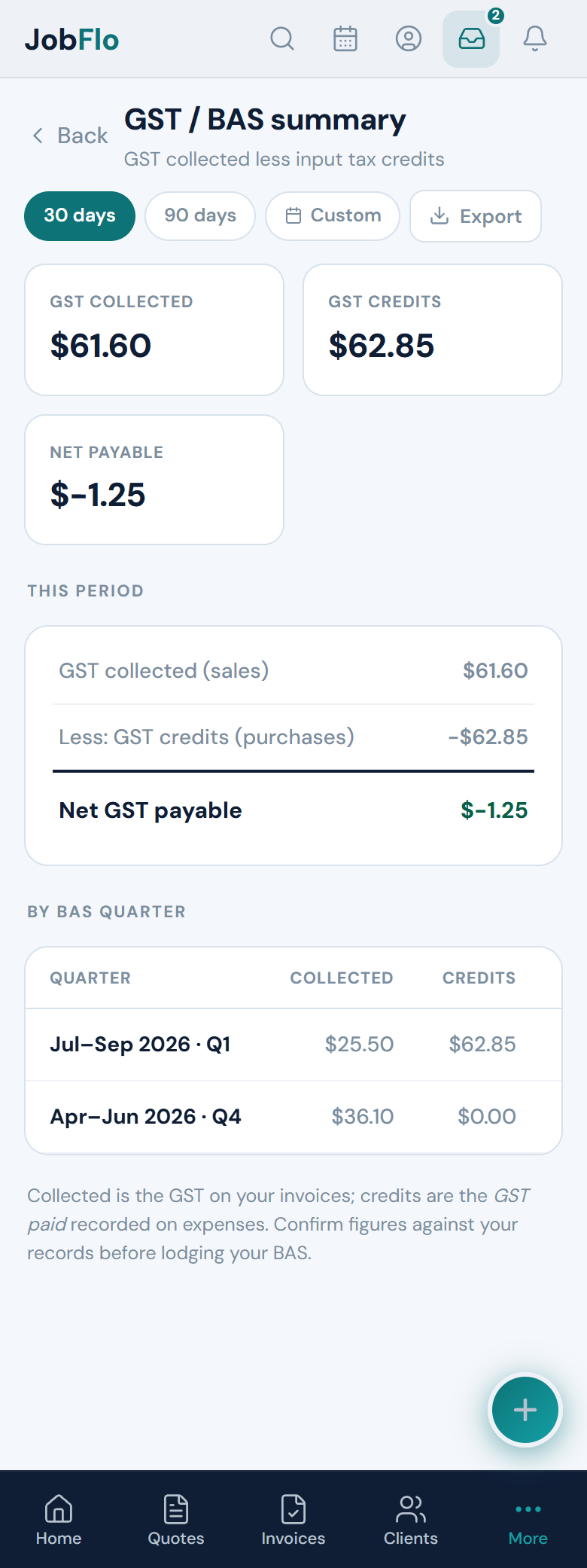
The GST / BAS summary pulls the GST out of your invoices and expenses so you can see your net GST position for a period. It is a summary of your own records — a starting point for your BAS, not a lodgement.
- Open More → Reports → GST / BAS summary.
- Set the date range you want — a single BAS quarter, or a full financial year.
- Read the three figures: GST collected, GST credits, and Net GST payable.
What each figure means
- GST collected (sales) — the GST on the invoices you have raised.
- GST credits (purchases) — the GST you recorded as paid on your expenses.
- Net GST payable — GST collected less GST credits. A positive figure is what you would owe; a lower or negative figure reflects credits outweighing collections.
Below the summary, the report also splits the same figures out by BAS quarter, so a financial-year view lets you see each quarter side by side.
The GST credits figure only reflects the GST you actually recorded against each expense. If an expense was logged without its GST amount, its credit will not appear here — so keep expense records complete for the figures to be accurate.
JobFlo does not provide tax advice. The GST report is a summary of the data you have entered, not a substitute for professional advice. Always confirm the figures against your own records and check with your accountant or registered BAS agent before you lodge.
Was this article helpful?
Related articles
Still stuck? Contact JobFlo